SOAP Connector
The SOAP Connector facilitates communication with SOAP web services, allowing you to integrate with systems that expose their functionalities via the SOAP protocol. It simplifies the process of sending SOAP requests and processing responses within your flows.
- The SOAP Connector exclusively uses POST requests for all interactions.
- It supports an Enable Retry mechanism for handling transient network issues or service unavailability.
Configuration
To configure the SOAP Connector, follow these steps:
- Drag and drop the SOAP Connector from the connectors panel onto your design canvas. Give the node a descriptive name.
- Right-click on the connector node to access its configuration properties. You will define the following parameters:
General Settings
| Fields | Description | Example |
|---|---|---|
| Datasource Name | The name of the datasource configured in connection properties that provides the base URL for the SOAP service. This is a mandatory field. | soapds |
| Base Path | The specific path to the SOAP web service endpoint. This is appended to the datasource's base URL to form the complete service URL. This is a mandatory field. | /webserviceserver/NumberConversion.wso |
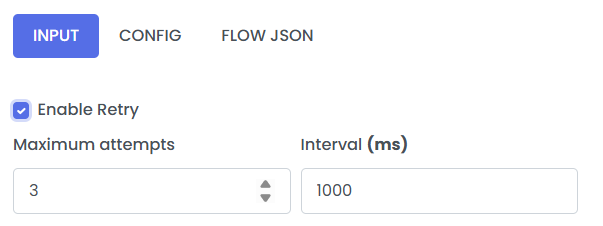
| Enable Retry | A checkbox to enable or disable automatic retries for the SOAP call in case of failure. | (checkbox) |
Input Configuration
The SOAP Connector supports two methods for providing the SOAP request body: direct input from the pipeline or using a pre-defined template.
1. Using a Template
Select the Use Template radio button if your SOAP request body is stored as a resource. You will need to select the resource name from the dropdown.
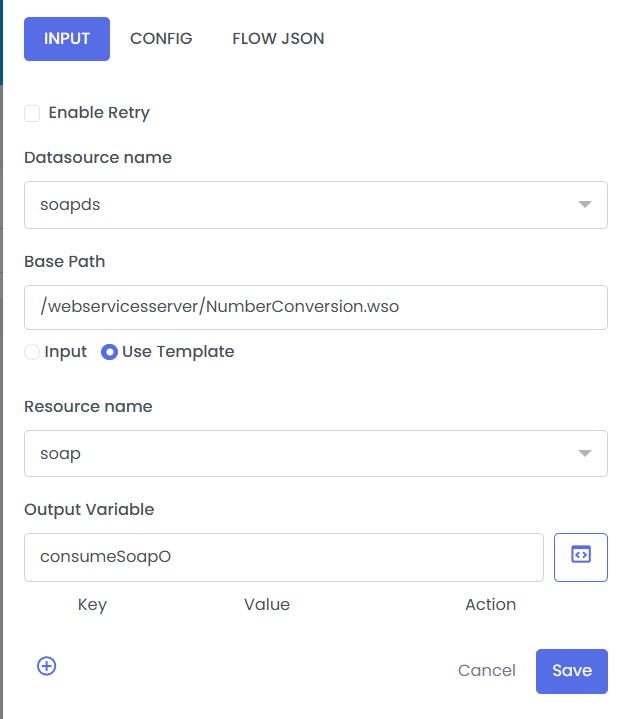
- The resource needs to uploaded to see it in dropdown.
| Fields | Description | Example |
|---|---|---|
| Resource name | The name of the template resource containing the SOAP request XML. This template will be used as the body for the SOAP call. | soap |
2. Direct Input / Body
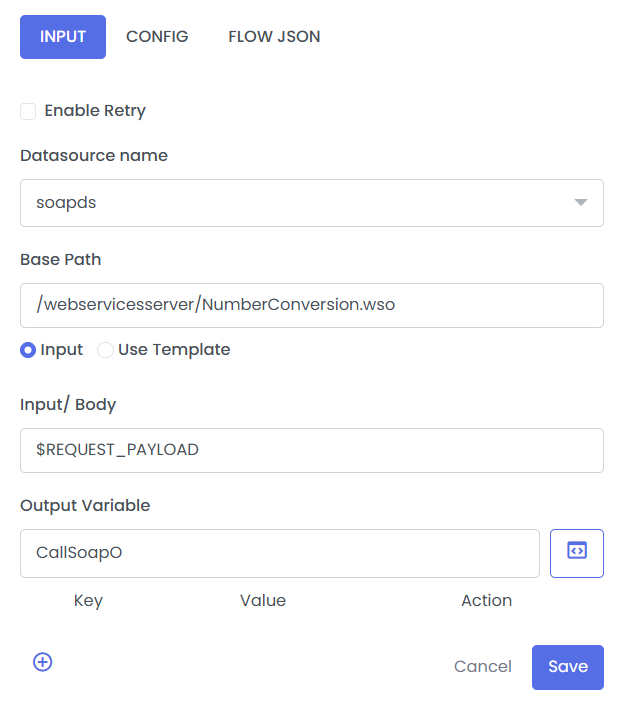
Select the Input radio button if the SOAP request body is provided directly from the pipeline (e.g., from a previous step's output variable) or as a static string.
| Fields | Description | Example |
|---|---|---|
| Input / Body | The variable or static string containing the SOAP request XML. This can be a reference to a pipeline variable like $REQUEST_PAYLOAD or a static XML string. | $REQUEST_PAYLOAD |
Output Configuration
| Fields | Description | Example |
|---|---|---|
| Output Variable | The name of the variable where the response from the SOAP call will be stored. This is a mandatory field. | consumeSoapO |
Retry
Retry is flag passed on connector nodes, like SOAP, to allow the step to be retryable if any exception occurs. It has 2 configurable properties.
- maxRetryAttempts: The max number of retries if any exception occurs. max attempts are 3.
- retryIntervalMillis: The max interval between retries. Max range is 6000ms.
Enable retry by cliking on the Enable Retry radio button at the top of the configuration pannel.